In Part 10, I added the Windows identity layer: Active Directory, DNS, DHCP, and a domain-joined client. In this part, I turn the lab from “everything can reach everything while I build” into an explicit firewall policy.
The goal is not to make the rules fancy. The goal is to make every allowed path explainable.
What I Built
I replaced the temporary build-phase allow rules with a segmented pfSense policy:
Default posture:  deny by default
Management:       Tailscale + break-glass LAN/WAN access
Jumpbox:          Alpine SSH path into Kali
Client VLAN:      AD, DNS, Wazuh, Windows Update only
Container VLAN:   Docker host + n8n explicit egress only
Honeypot VLAN:    Wazuh telemetry only
Pentest VLAN:     no internet egress
Isolated VLAN:    no ingress, no egress
Why This Matters
Segmentation is not only VLANs and subnets. A segment becomes meaningful only when its firewall policy matches its role.
During the build phase, broad allow rules were useful. VMs needed updates, installers, domain joins, package pulls, and quick troubleshooting. But leaving those rules in place would erase most of the security value of the architecture.
This pass makes the lab closer to a real environment:
- endpoints can reach domain services, but not the whole lab;
- Wazuh receives telemetry without becoming a reason for broad access;
- vulnerable systems stay contained;
- malware-analysis hosts cannot escape;
- management access is separated from ordinary network reachability.
Topology Slice
Tailscale / MacBook
  |-- pfSense management
  |-- Proxmox management
  |-- Alpine jumpbox
  |-- Wazuh dashboard

DEFENCE / MANAGEMENT
  |-- DC / DNS / DHCP
  |-- Wazuh
  |-- Alpine jumpbox

CLIENT
  |-- Windows client with Wazuh agent and Sysmon

CONTAINER
  |-- Docker host
  |-- n8n
  |-- vulnerable containers

PENTEST
  |-- Kali
  |-- vulnerable target

HONEYPOT
  |-- T-Pot

ISOLATED
  |-- FLARE-VM
  |-- REMnux
Build Steps
Isolate VLAN 99
The malware-analysis segment is the strictest policy in the lab. It is not a normal user or server network.
ISOLATED -> any: blocked
Other VLANs -> ISOLATED: blocked
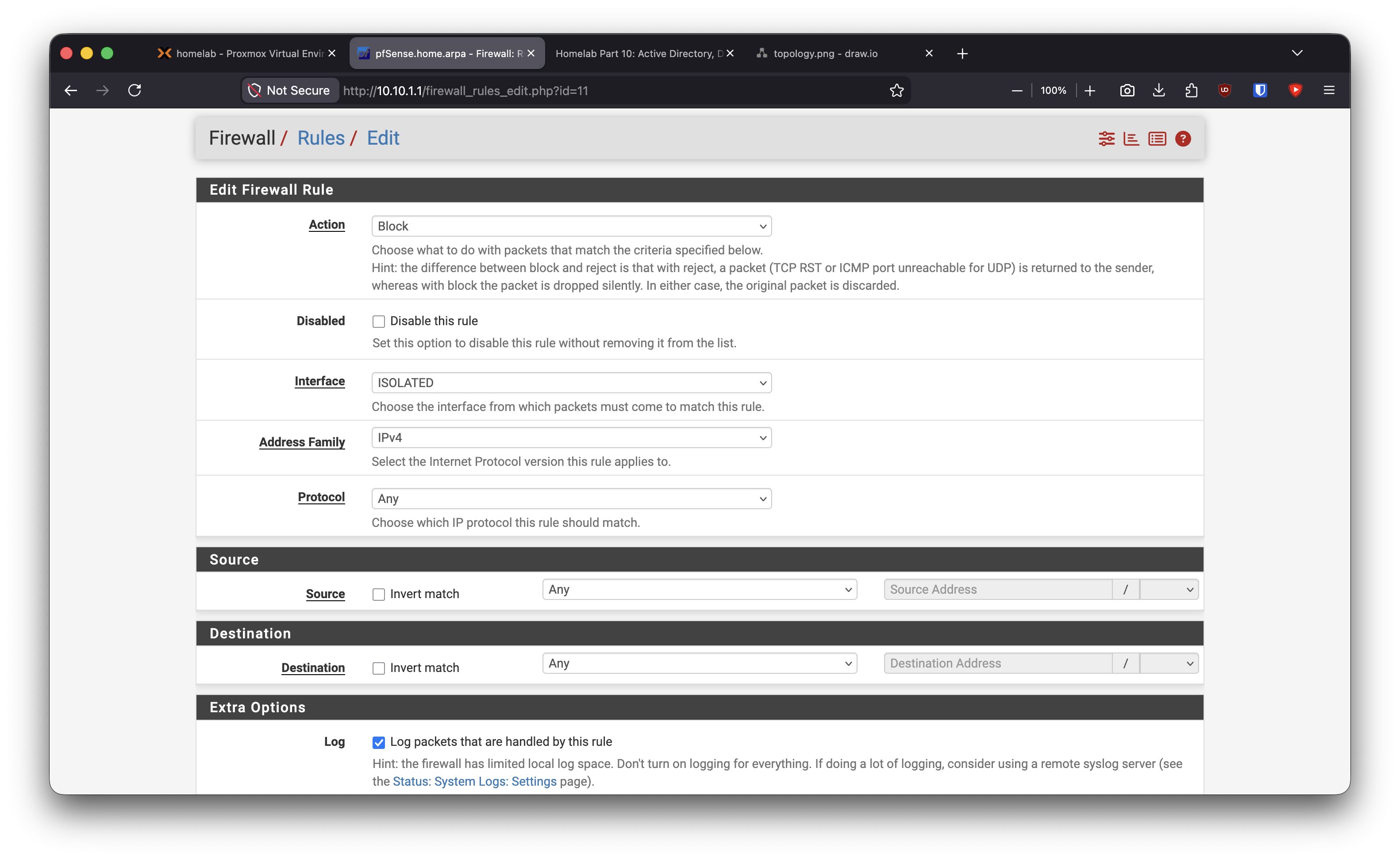
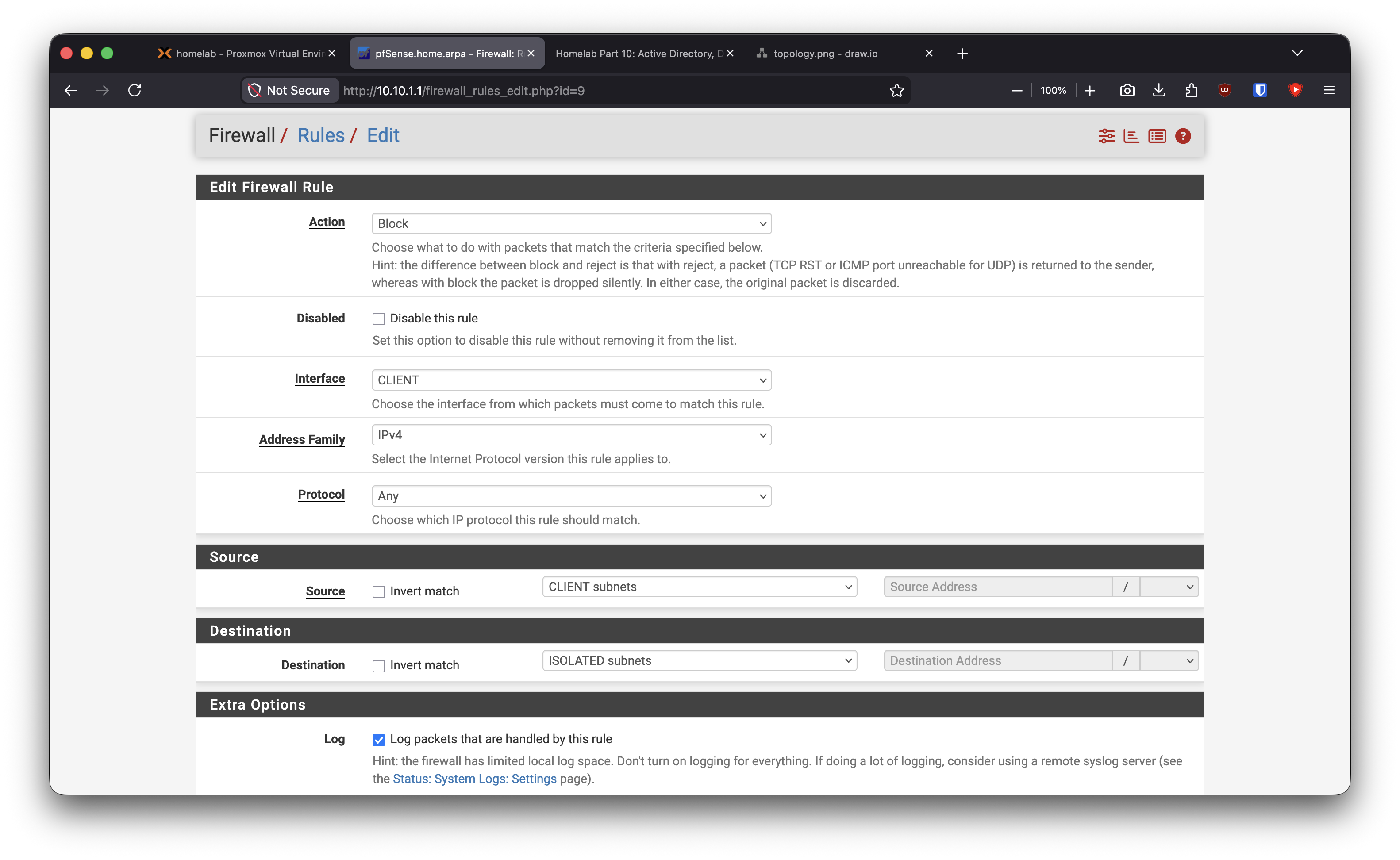
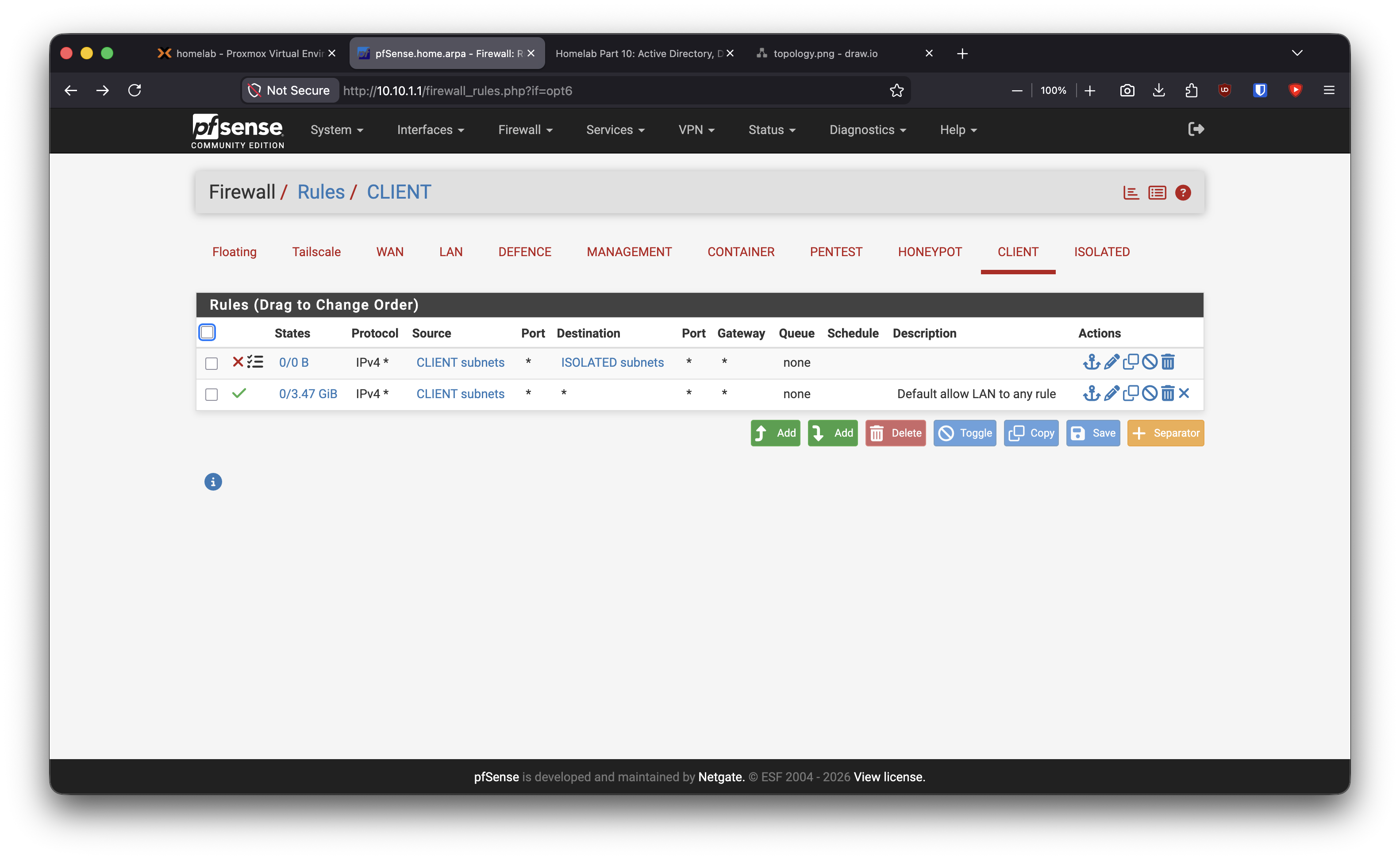
The important design point is simple: malware-analysis isolation should not depend on memory or discipline. If I forget what a host is doing, the network path should still be closed.
Move the Jumpbox Into the Management Path
The Alpine VM started as early build infrastructure. After the lab matured, I moved it into the management side and gave it a stable address.
Jumpbox: 10.10.10.50
Role:    controlled SSH pivot
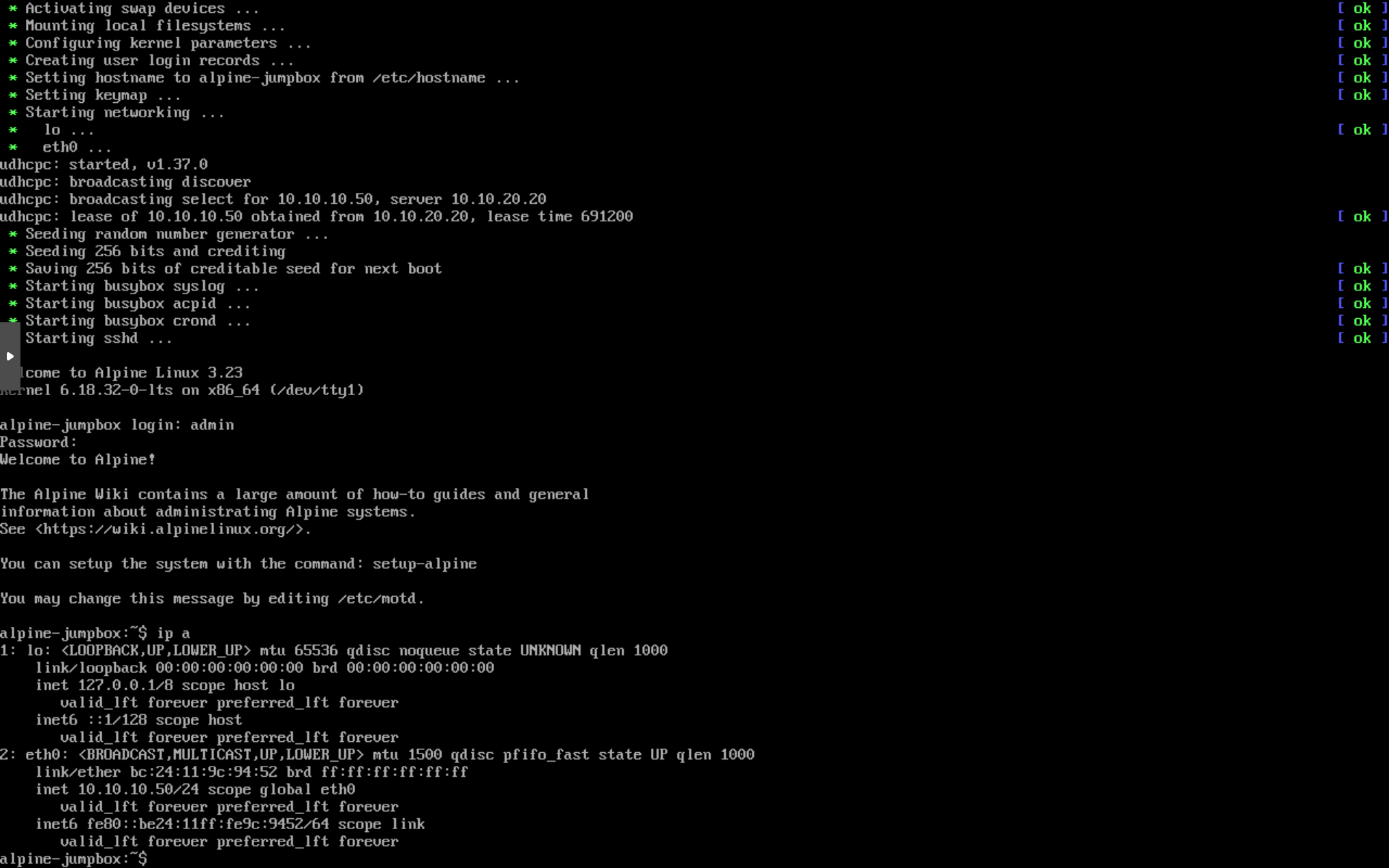
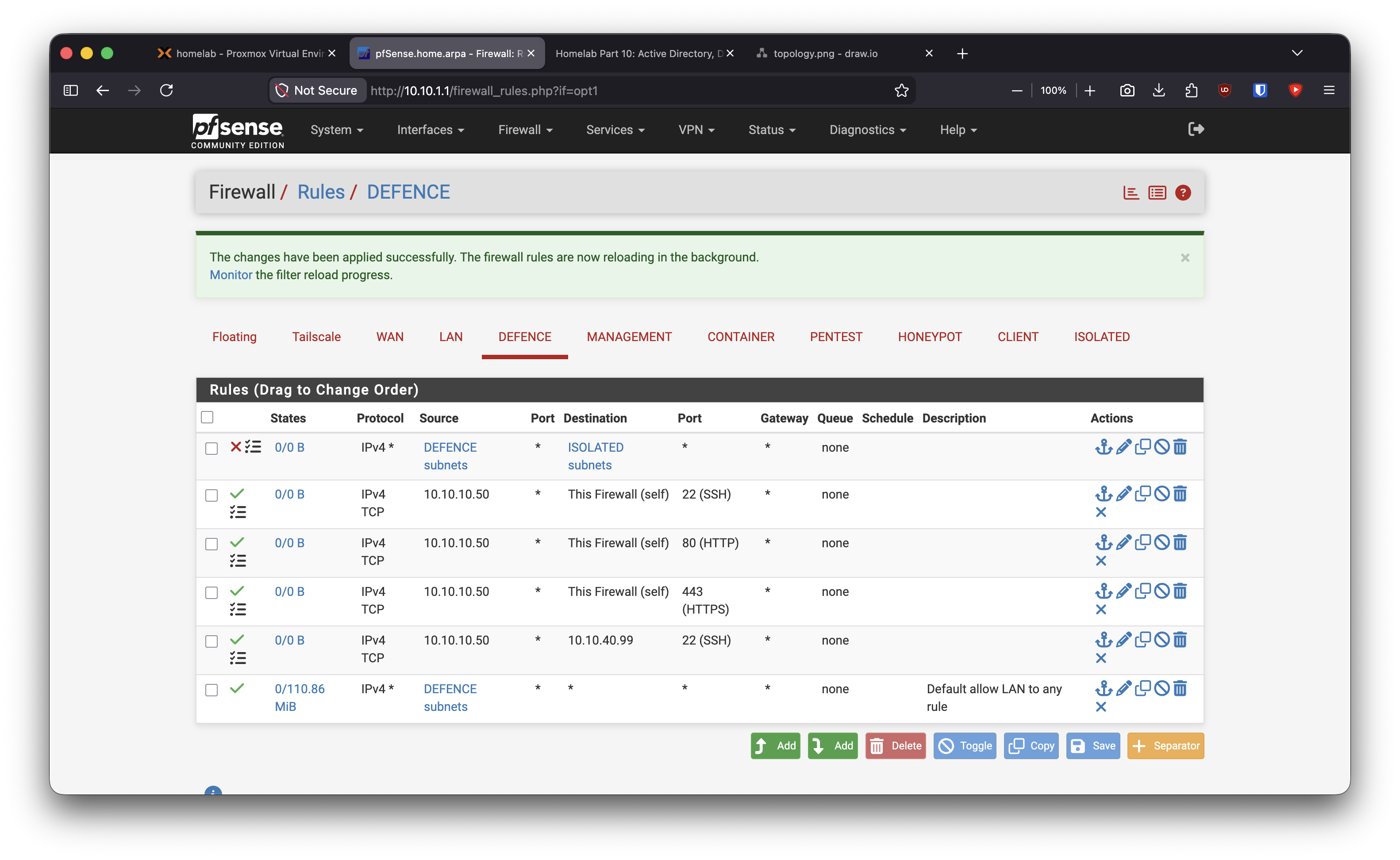
The jumpbox is not a replacement for Tailscale. Tailscale is the remote access plane; the jumpbox is the internal administrative pivot.
Harden Management and Domain Services
The management side contains the DC, Wazuh, and jumpbox, so I kept it useful but not wide open.
DC -> Internet:     update/NTP only
DC -> Wazuh:        reserved telemetry path
Jumpbox -> pfSense: SSH/HTTPS
Jumpbox -> Kali:    SSH
Management -> ISOLATED: blocked
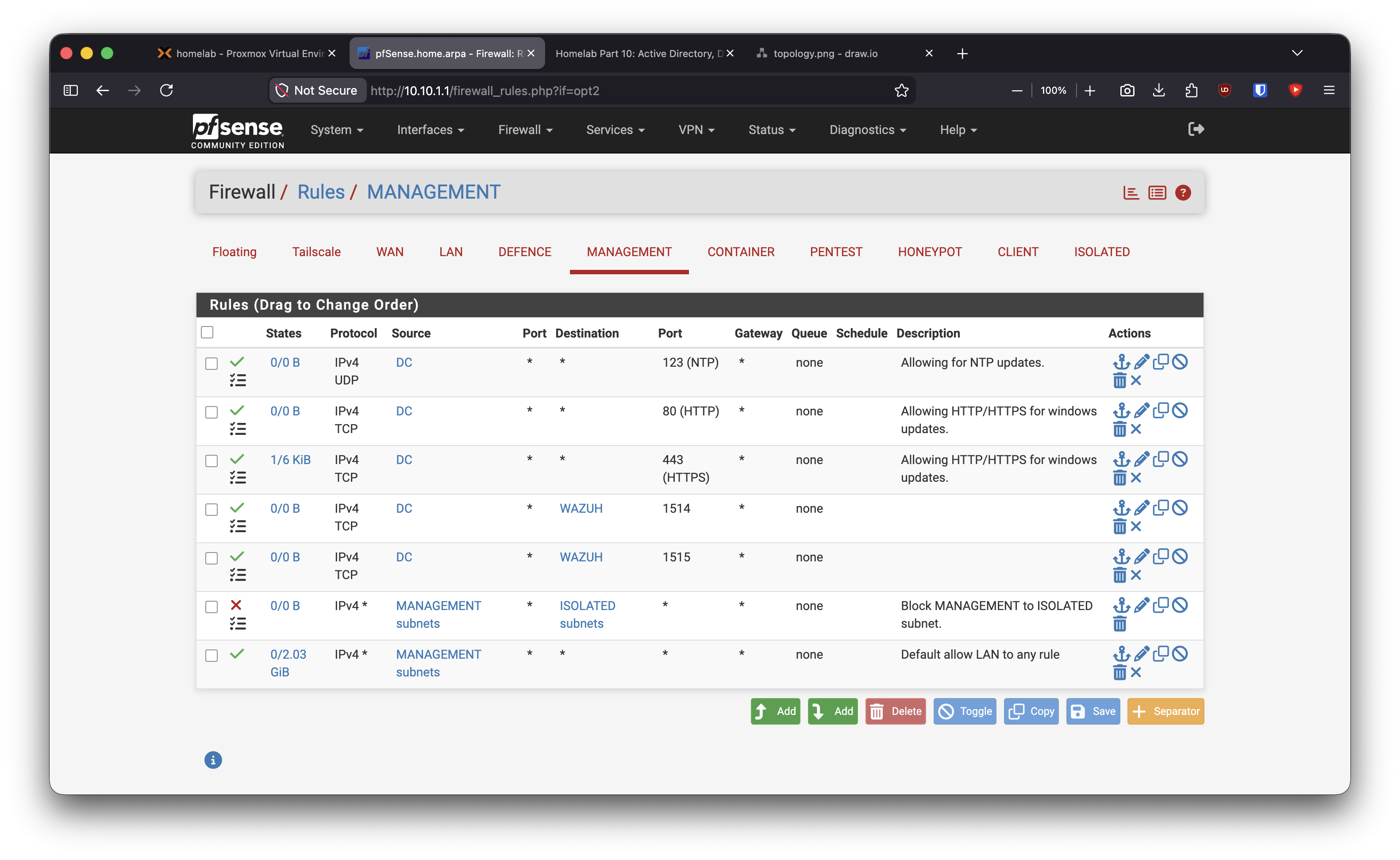
In Part 10, I prepared the Wazuh agent baseline on the Windows DC and client. The important firewall decision here is that telemetry paths are explicit, not hidden behind any-any access.
Restrict the Client VLAN
The Windows client needs the domain controller and Wazuh, not every lab segment.
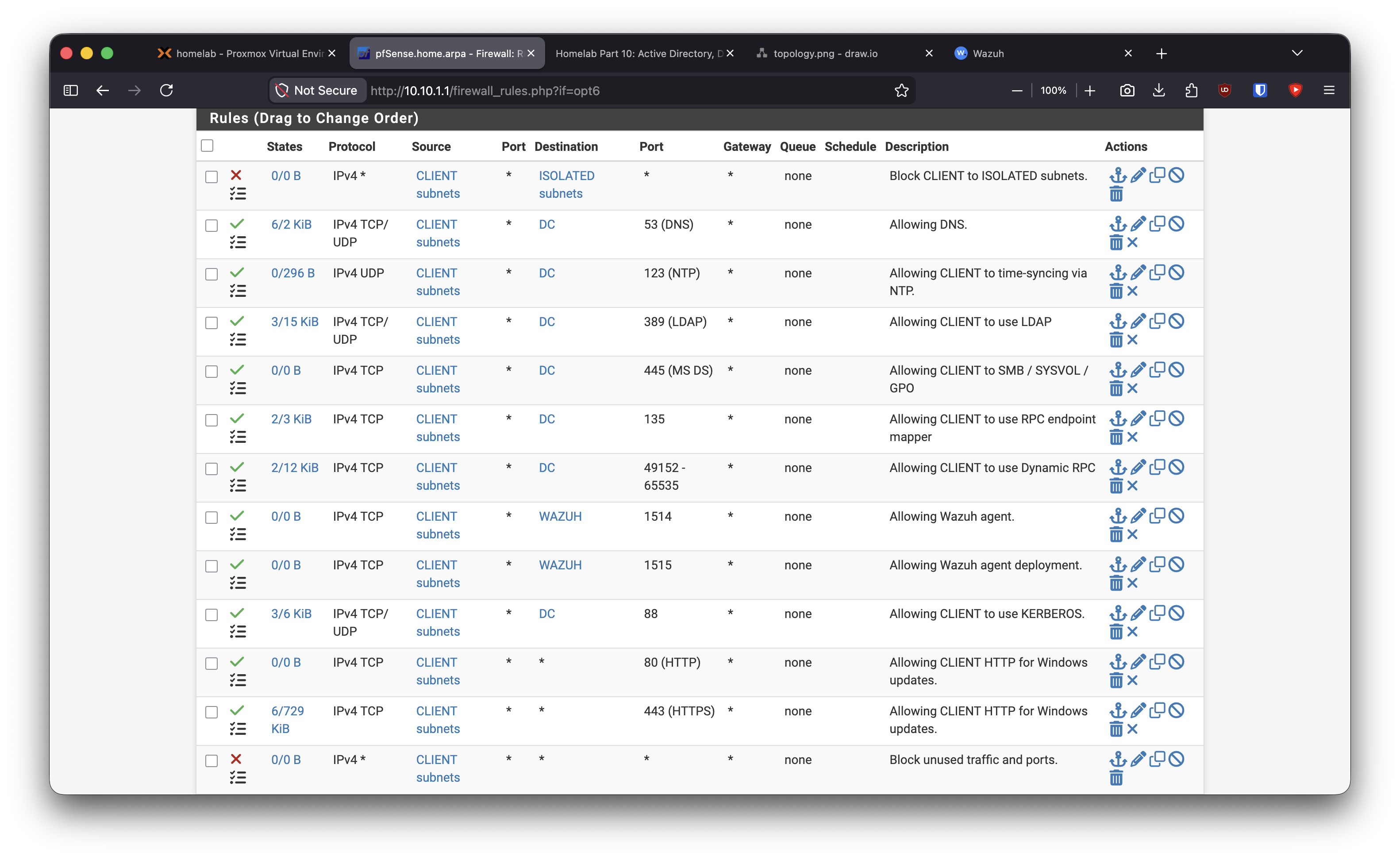
CLIENT -> DC:     DNS, NTP, Kerberos, LDAP, SMB, RPC
CLIENT -> Wazuh:  Wazuh agent traffic
CLIENT -> Internet: Windows Update HTTP/HTTPS
CLIENT -> ISOLATED: blocked
CLIENT -> everything else: blocked
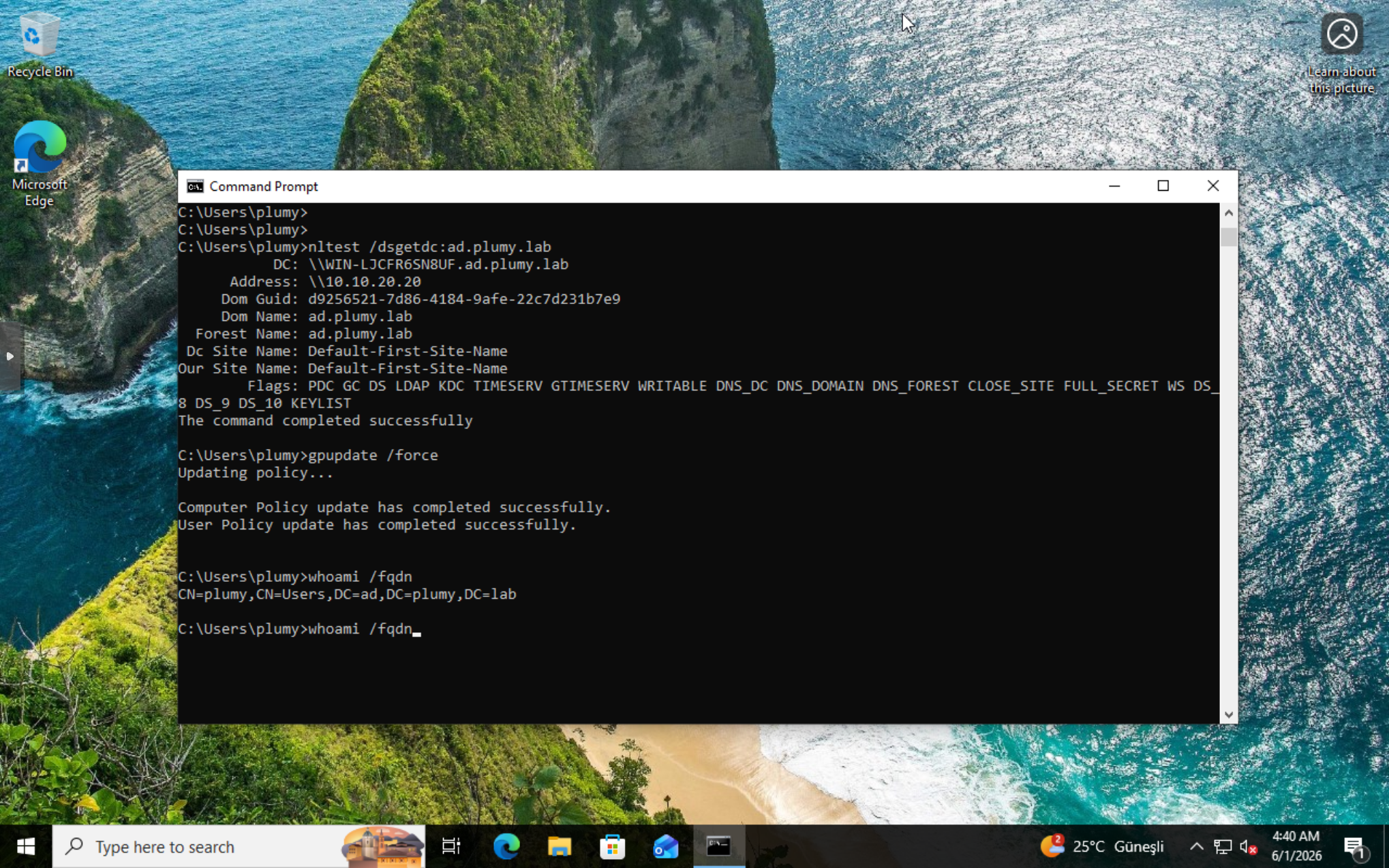
This keeps the Windows endpoint realistic enough for AD and Sysmon work while preventing it from becoming a free pivot into the rest of the lab.
Restrict Honeypot Egress
The honeypot segment should be observed, not trusted.
HONEYPOT -> Wazuh: TCP 1514
HONEYPOT -> ISOLATED: blocked
HONEYPOT -> everything else: blocked
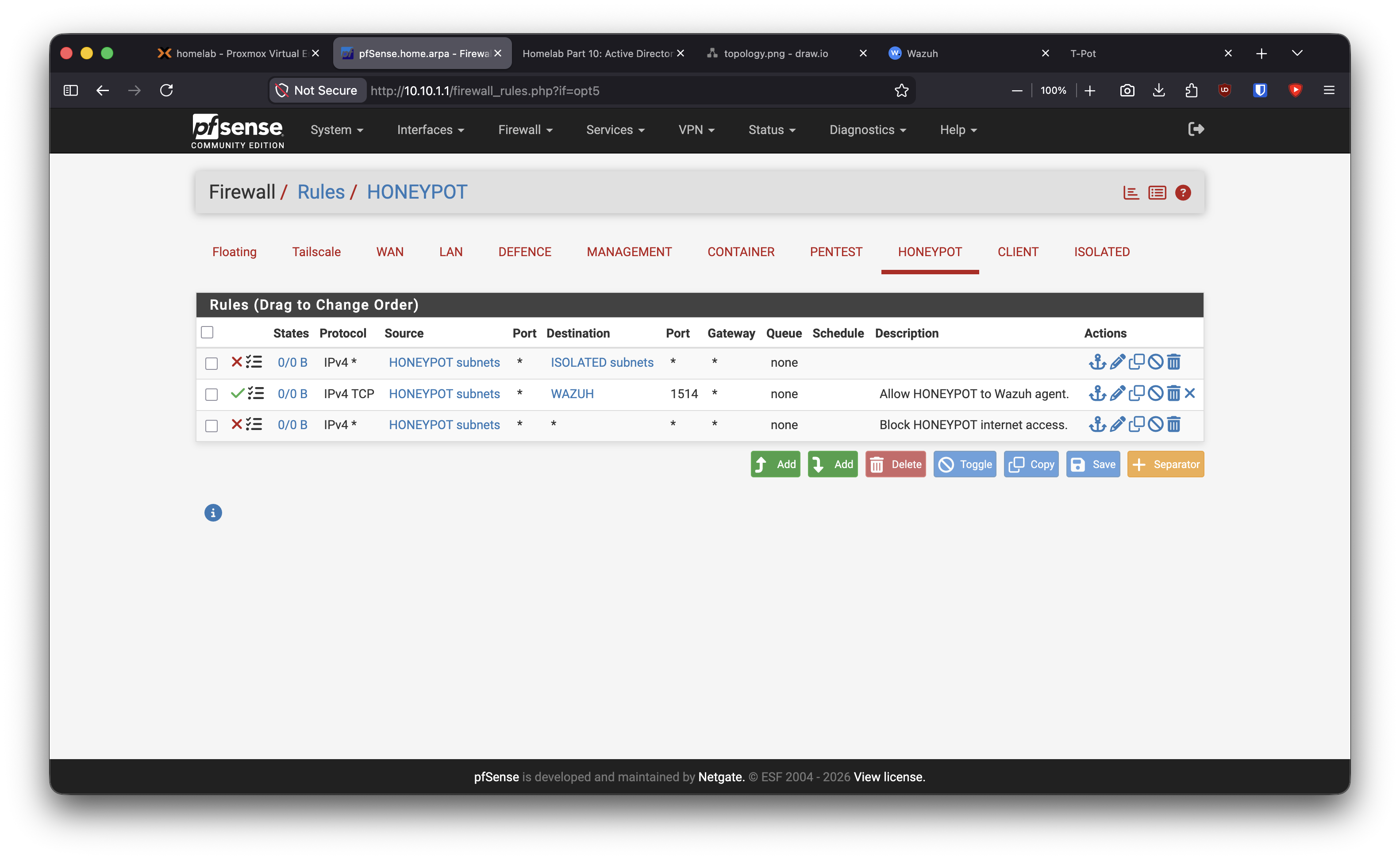
This makes T-Pot a sensor island. It can report what it sees, but it does not get general access to the lab or the internet.
Restrict Container Egress
The Docker host needs updates and image pulls. n8n needs outbound web access. Vulnerable containers do not need internet access.
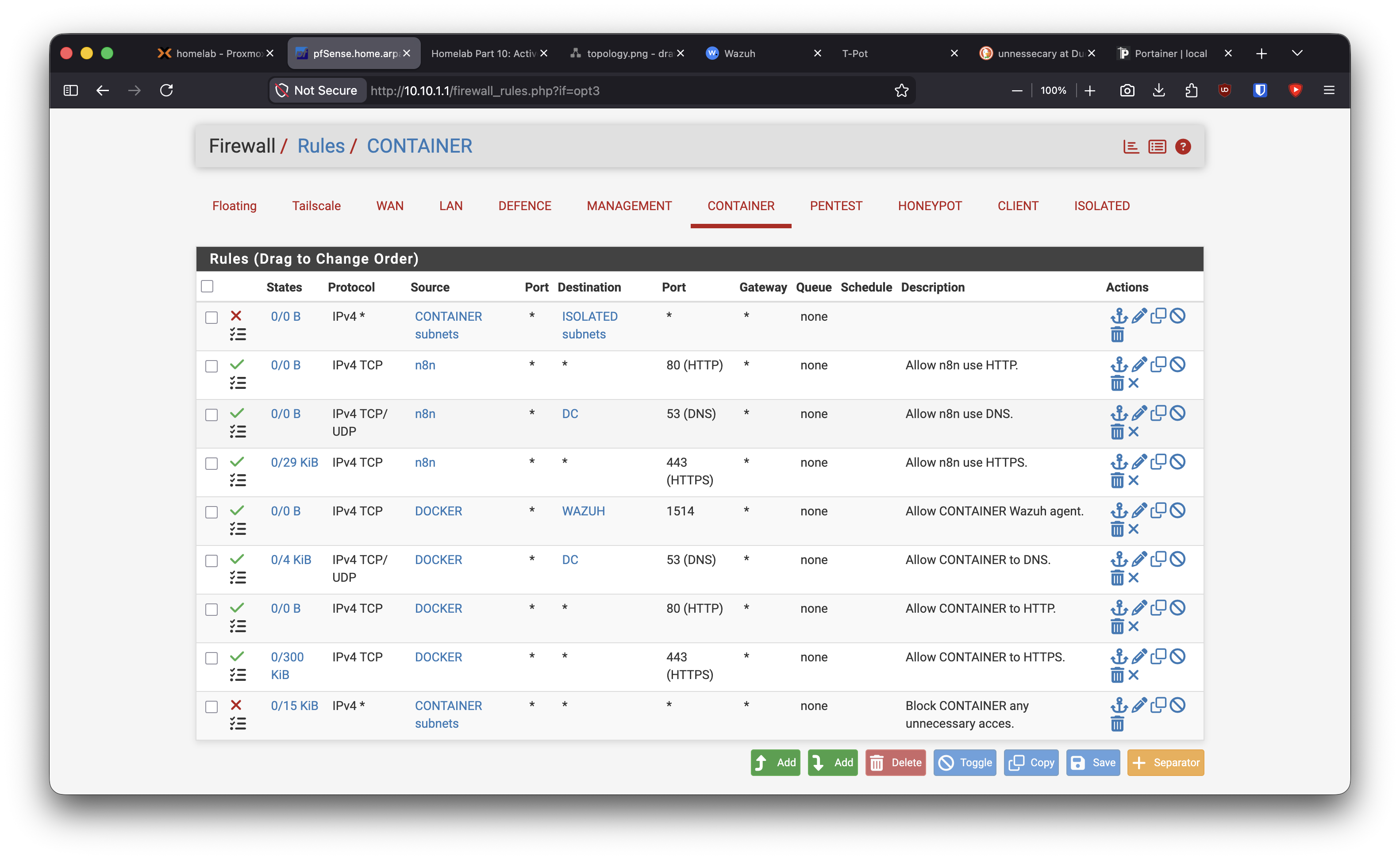
Docker host -> Wazuh: TCP 1514
Docker host -> DC:    DNS
Docker host -> Web:   HTTP/HTTPS
n8n -> DC:            DNS
n8n -> Web:           HTTP/HTTPS
Other containers:     blocked by default
The useful rule here is simple: container egress is not granted to the whole VLAN. It is granted per named workload.
Lock Down the Pentest VLAN
Kali does not need direct internet access for this lab stage. I use the MacBook for research and downloads, then reach Kali through the jumpbox.
Jumpbox -> Kali: SSH allowed
Kali -> Internet: blocked
PENTEST -> ISOLATED: blocked
PENTEST -> everything else: blocked
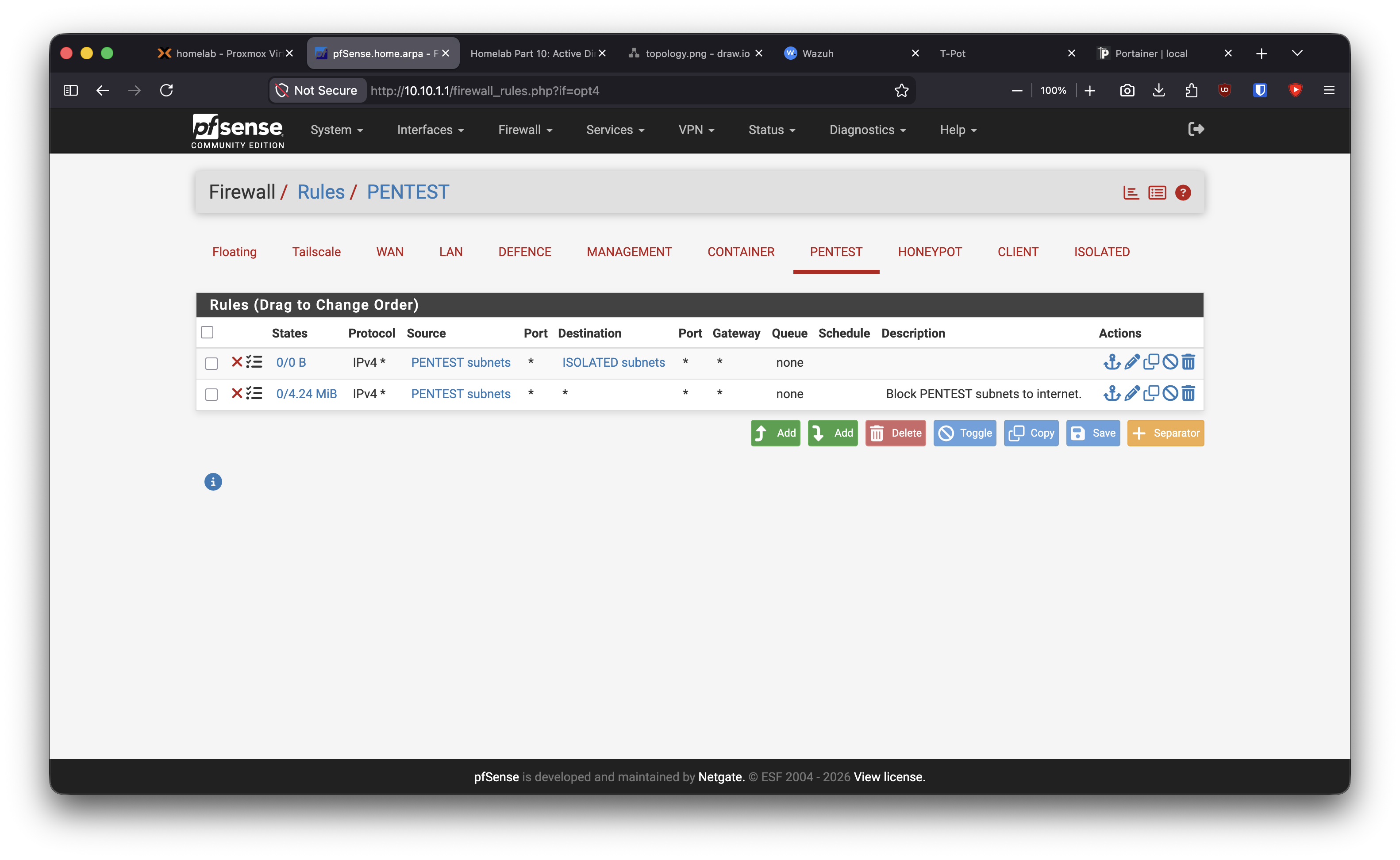
This keeps Kali as an attack VM inside the lab, not as a general-purpose workstation.
Define Management and Break-Glass Access
Tailscale is the primary management plane. LAN and WAN access are only fallback paths from my MacBook.
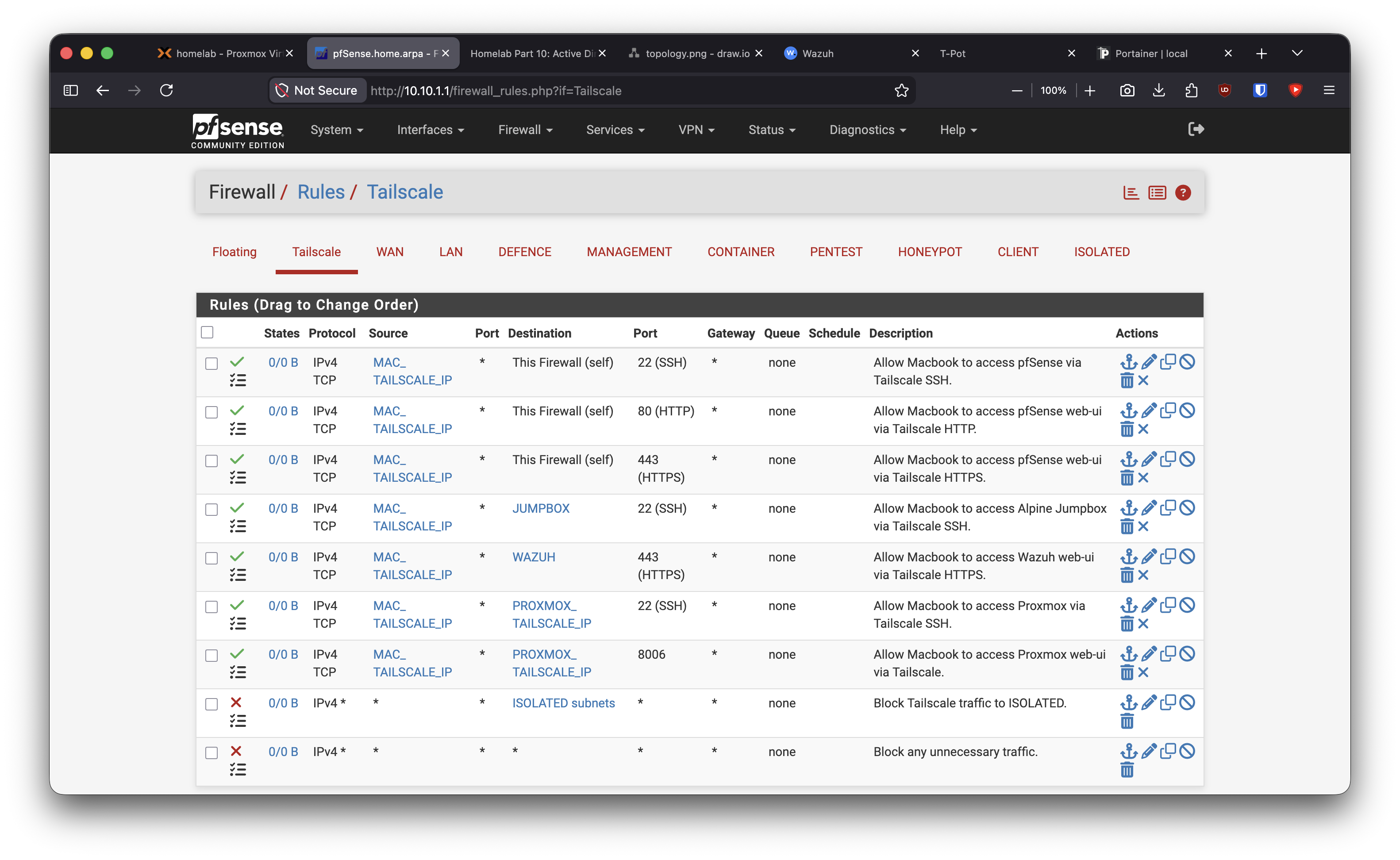
MacBook over Tailscale -> pfSense SSH/HTTPS
MacBook over Tailscale -> Proxmox SSH/8006
MacBook over Tailscale -> Wazuh HTTPS
MacBook over Tailscale -> Jumpbox SSH
Tailscale -> ISOLATED: blocked
Tailscale -> everything else: blocked
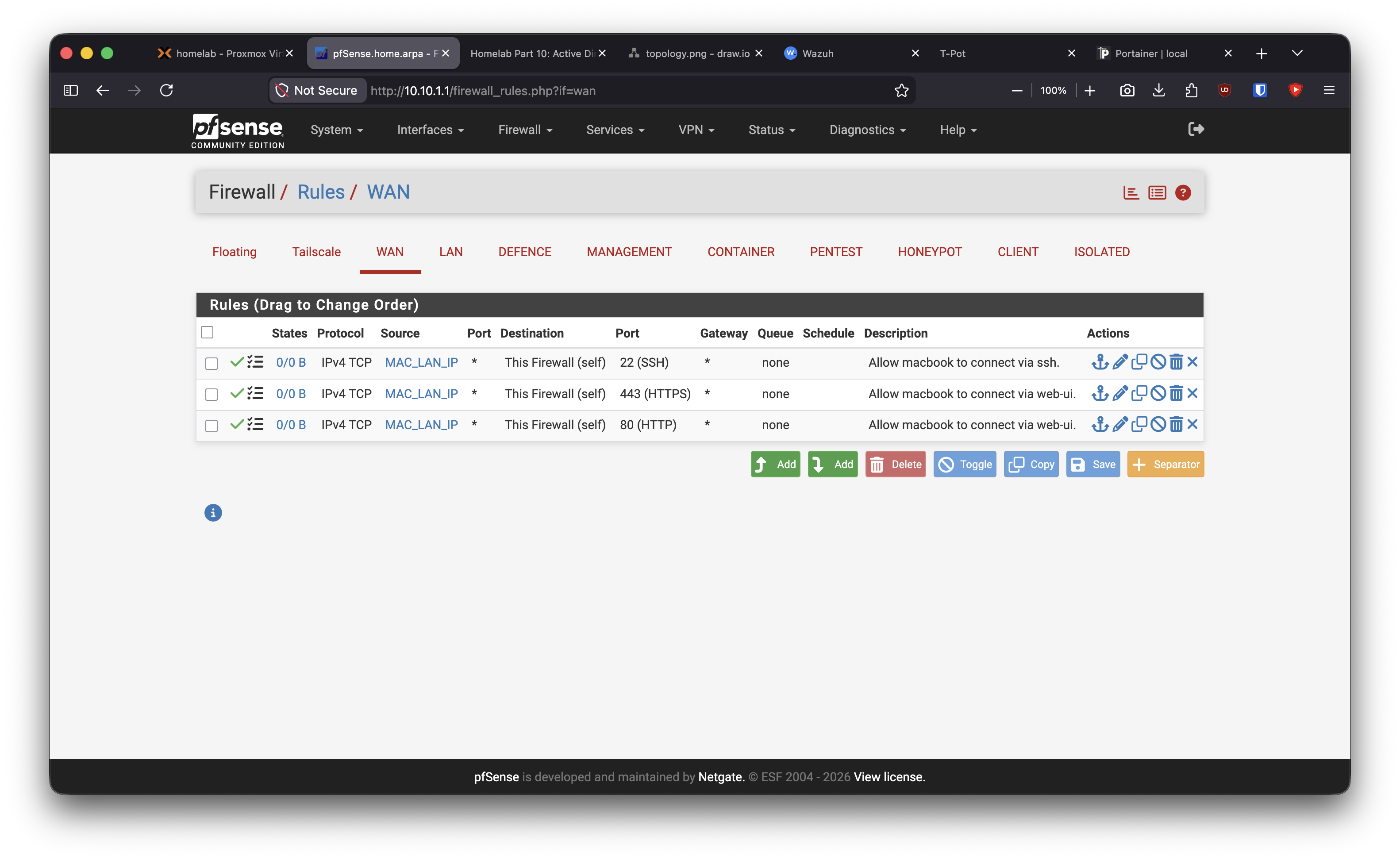
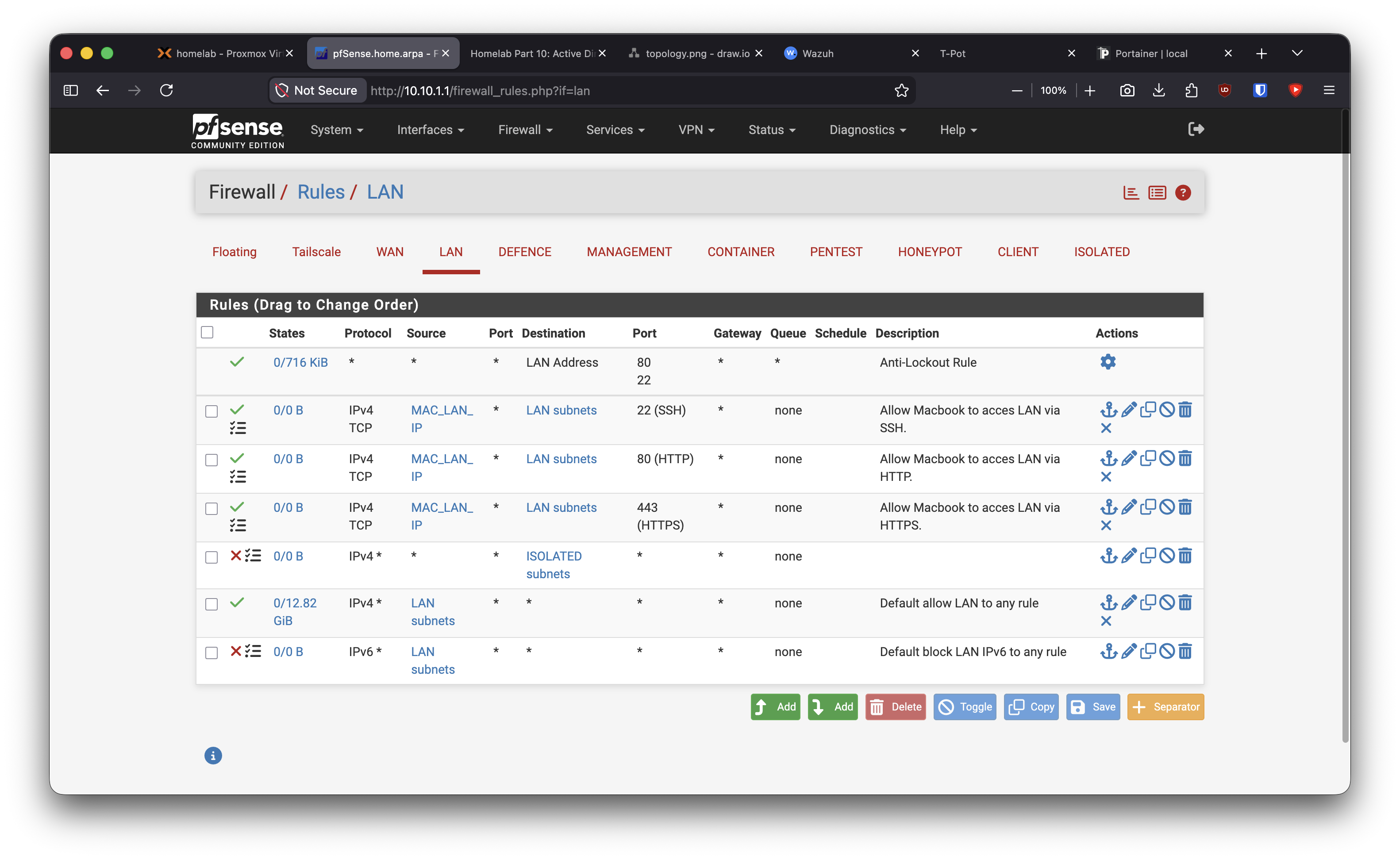
The design choice is intentional: management should be tied to authenticated access and known admin hosts, not just physical presence on the home network.
Problems I Hit
Interface direction matters. pfSense evaluates rules on the interface where traffic enters. A CLIENT-to-DC rule belongs on CLIENT, not on the DC’s interface.
“This Firewall” is broader than an interface address. For tight management rules, LAN address or WAN address can be more precise than This Firewall.
Tailscale is an interface, not a source object. On the Tailscale tab, the source is still an IP or alias such as my MacBook’s Tailscale IP.
DHCP reservations can be annoying with unusual client identifiers. For the Docker host, I accepted the stable reservation the server created and used that address in aliases.
Pass rules can accidentally become policy documentation only. Until the default allow rule is removed or superseded, explicit rules do not enforce much. The final deny rule is what makes the allow list meaningful.
What I Learned
Firewall hardening is mostly about direction and ownership. Each VLAN needed a clear answer to three questions:
What is this segment allowed to consume?
What is this segment allowed to publish?
What should never be reachable from here?
I also learned that telemetry needs to be treated as a first-class path. Wazuh access should be intentionally allowed from each relevant segment, not accidentally inherited from a broad rule.
The biggest mindset shift was separating convenience from architecture. Build-phase access is useful, but it should have an expiry date.
Validation Evidence
I validated the rules with practical reachability checks:
Kali reachable only through the jumpbox by SSH
Kali direct internet access blocked
CLIENT domain discovery still works
CLIENT Wazuh/Sysmon telemetry reaches Wazuh
HONEYPOT can report to Wazuh
Docker host and n8n retain only their required egress
ISOLATED remains unreachable from routed lab segments
Tailscale management paths still work
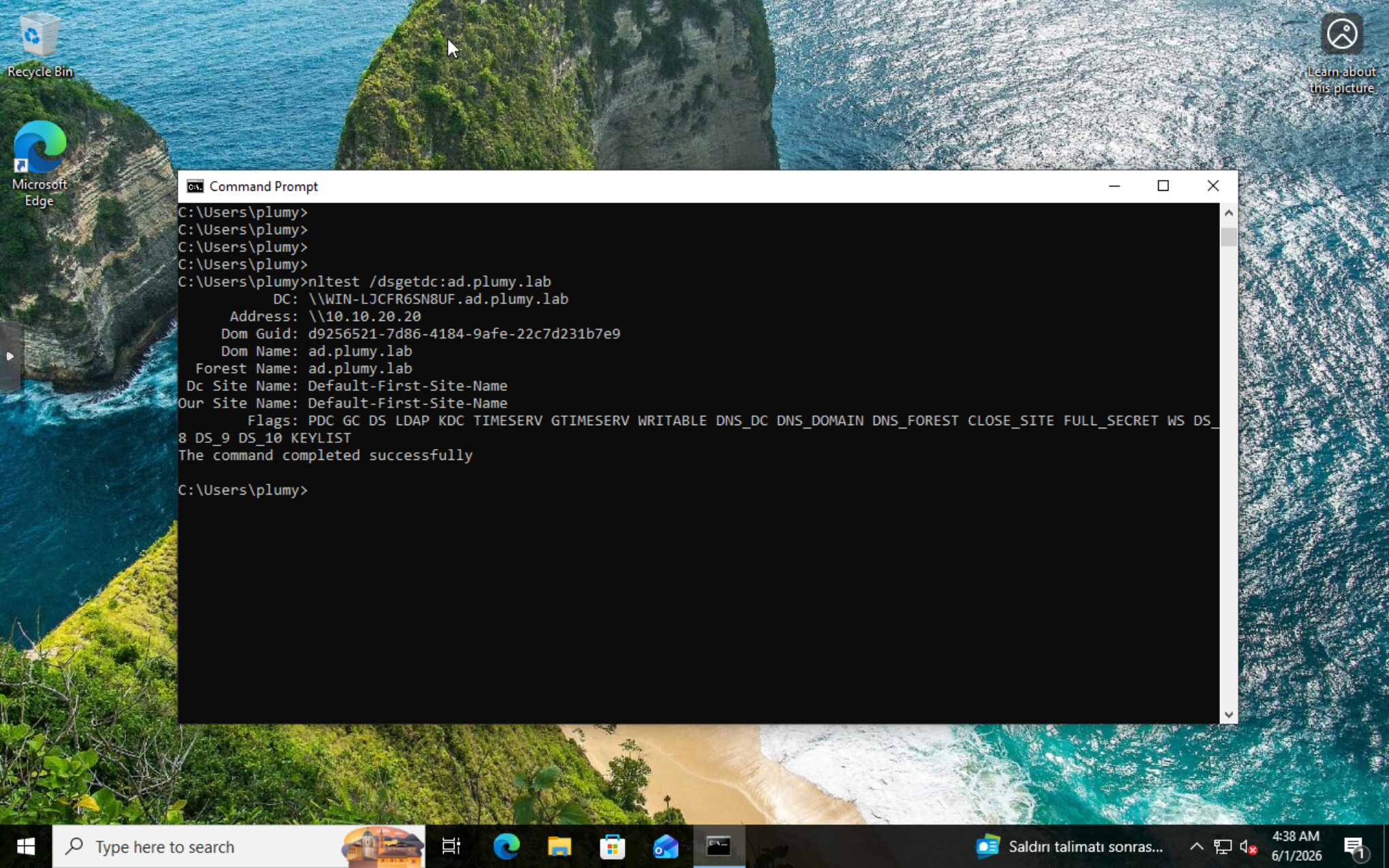
Sysmon Telemetry Smoke Test
Before moving into attack simulation, I confirmed that endpoint telemetry still reaches Wazuh after hardening.
On the Windows client, I installed Sysmon, added the Sysmon Operational channel to the Wazuh agent configuration, restarted the agent, and generated a small PowerShell process event.
In Wazuh Discover, this query returned events from client1:
data.win.system.providerName:"Microsoft-Windows-Sysmon"
The events included powershell.exe, parent process metadata, and the client agent identity. This is not detection engineering yet. It only proves the telemetry path survived the firewall change.
What This Enables Next
The lab now has identity, endpoint telemetry, network telemetry, and firewall segmentation. Part 12 will move into controlled attack simulation and reporting: run a small set of Atomic Red Team tests, collect the Wazuh/Sysmon events, and explain what the detections actually show.
Quick Reference
Default rule model:
  allow required service paths
  block ISOLATED explicitly
  block everything else
Core telemetry:
  CLIENT   -> WAZUH TCP 1514
  DC       -> WAZUH TCP 1514
  DOCKER   -> WAZUH TCP 1514
  HONEYPOT -> WAZUH TCP 1514
Core identity:
  CLIENT -> DC DNS/Kerberos/LDAP/SMB/RPC
Management:
  MacBook Tailscale IP -> pfSense / Proxmox / Wazuh / Jumpbox
  MacBook LAN/WAN IP   -> pfSense break-glass only